
There are situations where you may need to cancel an SSL certificate—whether you purchased the wrong type, made a setup error, or no longer require it. Knowing the cancellation process and your eligibility for a refund will help you manage your SSL services efficiently.
Typically, SSL certificates can be cancelled through your hosting provider or certificate issuer. Refund policies, however, vary depending on the timing and the Certificate Authority (CA) involved.
When to Cancel an SSL Certificate
Common reasons for cancelling an SSL certificate include:
- Purchasing the wrong type of certificate (e.g., Domain Validation instead of Wildcard).
- Reissuing the certificate with updated information.
- Moving to a host that provides a free SSL certificate.
- Discontinuing use of a domain or service.
How to Delete an SSL Certificate in cPanel
This guide assumes your SSL certificate was purchased through tandohost.co.za .
How to Log in to Your Domains Account
- Log in to your tandohost.co.za account. Login - TandoHost
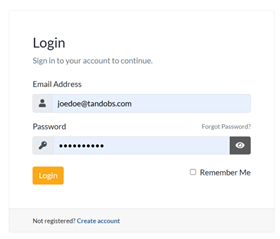
2. From the dashboard, navigate to Products/Services
How to Access cPanel
- Click Login to access cPanel.

2. Navigate to Security and select SSL/TLS.
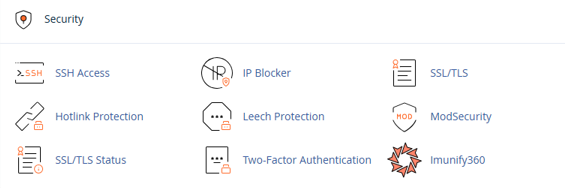
- Under Certificates (CRT), click Generate, view, upload, or delete SSL certificates.
- Under Certificates on Server, click Delete next to the SSL certificate you wish to remove. Copy the CSR when prompted for future renewal with your CA.
Refund Eligibility
Refunds depend on two main factors: the time since issuance and the policies of the Certificate Authority (CA).
You may qualify for a refund if:
- The certificate is cancelled within 7–30 days of issuance (varies by CA).
- The certificate has not been installed or used.
- You meet the refund requirements outlined by tandohost.co.za and the issuing CA.
Refunds are generally not available if:
- The SSL certificate was free as part of a hosting plan or bundle.
If you are unsure, contact Customer Support for guidance specific to your certificate.
Additional Information
Reissues vs. Cancellations
Minor issues, like a domain name typo, may not require cancellation. Most CAs allow unlimited free reissues during the certificate’s validity period.
Preventing Auto-Renewal Charges
Cancelling a certificate does not automatically stop future renewals or billing. Make sure to disable auto-renew if you do not wish to continue using the certificate.
General SSL Certificate Information
- DNS & Security Impacts: Cancelling an SSL certificate will trigger “Not Secure” warnings on browsers. Ensure a replacement certificate is in place if the domain is still active.
- Wildcard & Multi-Domain Certificates: Cancelling one affects all domains/subdomains listed on the certificate.
- Domain Validation Period: If domain validation is incomplete and no certificate has been issued, cancellation is usually easier, and refund approval is more likely.
- Support Assistance: If you are uncertain about cancelling or are within the refund window, contact Support. They can advise whether reissue, replacement, or cancellation is the best option.

