
This step-by-step guide will walk you through resetting your email password in cPanel quickly, securely, and without needing direct access to the email account itself. With tandohost.co.za’s Email Hosting, you can easily manage and update passwords for any email address linked to your domain — all from within your cPanel dashboard
How to Reset an Email Password in cPanel
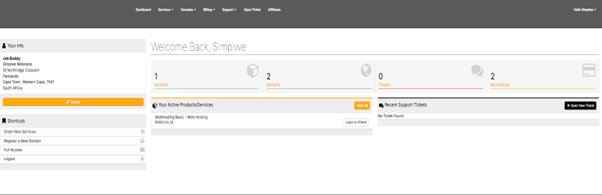
- Log in to your tandohost.co.za account. Login - TandoHost
- From the Active Products/Services, click login to cPanel
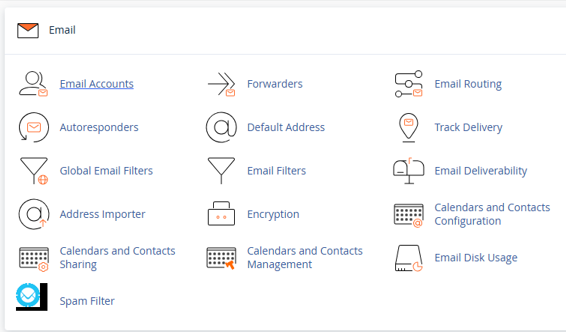
- Scroll to the Email section and click Email Accounts.
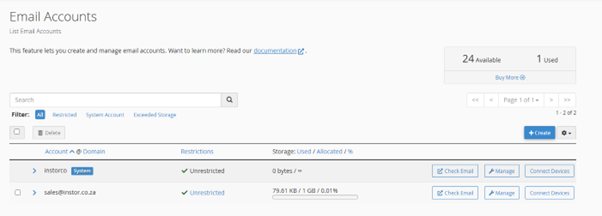
4. Locate the email address you wish to reset and click Manage next to it.
5. Under Security, type in a strong new password, or click Generate to create one automatically.
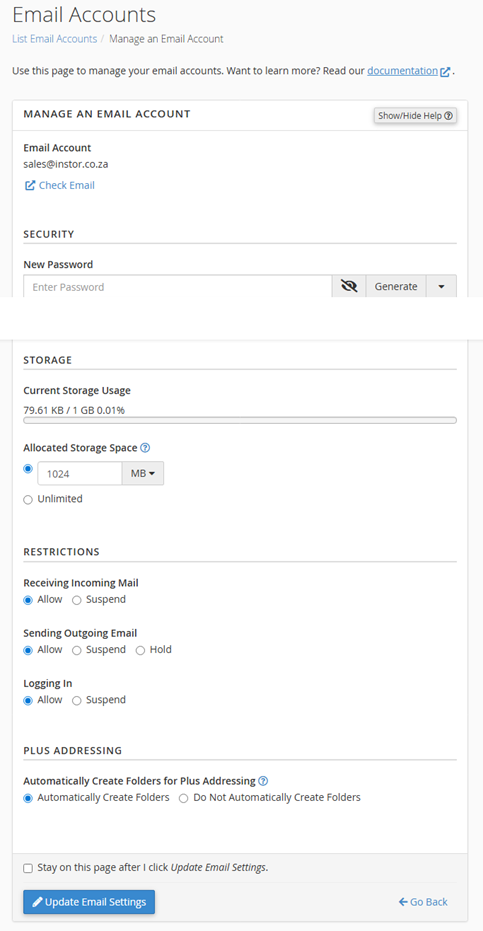
6. Click Update Email Settings to save your changes.
Note: You can reset passwords anytime through cPanel, even if you don’t have access to the email account itself.
After Resetting Your Email Password in cPanel
Once the password is updated, notify the account holder so they can update it on their email apps or devices.
Changing the password will sign them out of all active sessions, adding a layer of security if the account may have been compromised.
If they can’t access their usual email program, they can log in via Webmail using the new password.
When managing multiple domains, always double-check you’re updating the correct account.
Resetting the password won’t delete saved emails or settings, but the updated password must be re-entered in any email client (such as Outlook, Apple Mail, or Thunderbird).
Email Security Best Practices
- Create passwords of at least 12 characters, mixing uppercase, lowercase, numbers, and symbols.
- Avoid reusing old passwords or using weak combinations, especially for business or admin accounts.
- Use cPanel’s Generate feature for secure, random passwords and store them in a password manager.
- Enable Two-Factor Authentication (2FA) on your cPanel for extra protection.
- For advanced users or resellers, stronger password rules can be set via WHM.
- If you need help or forget your cPanel login details, tandohost.com’s Support Team is ready to assist.

