
The Suspension Run is an automated billing process that takes place approximately 7 working days after the Invoicing Run.
During this grace period, clients will receive three (3) overdue account notifications via their chosen contact method.
If payment is still not received, the Suspension Run will automatically suspend all services linked to unpaid or short-paid invoices.
Once suspended, your website will go offline, and all email accounts linked to the hosting service will stop sending and receiving emails.
It is the client’s responsibility to monitor their account and ensure payments are up to date to avoid service suspension.
Suspension Run – Questions & Answers
What is Suspension?
Suspension occurs when tandohost.co.za temporarily disables your hosting services due to an unpaid or short-paid invoice.
Even a shortfall of as little as R0.01 can trigger suspension.
How many days grace do I have before suspension?
You are given 7 calendar days after invoicing to settle your account.
If payment is not made in full, your services will be suspended.
Will I be notified before suspension?
Yes. You will receive three (3) overdue account reminders before the suspension run takes place.
How soon after payment will my services be restored?
Once your payment is received and a valid Proof of Payment (POP) is sent to our Billing Department, your services will be reactivated immediately.
Will I lose my data if suspended?
No. Your data remains safe on our servers.
However, you will not have access to your hosting package until all outstanding balances are settled.
Can I set up a Debit Order for suspended accounts?
Yes, but:
- The current overdue invoice must be paid first before services can be reactivated.
- Once your account is active again, our Billing team can assist you in setting up a Debit Order mandate.
I have paid but my services were suspended!
Payments without correct references (e.g., “Hosting” or “Domain”) cannot be allocated.
To resolve this:
- Send your Proof of Payment (POP) via a Support Ticket or email it to billing@tandohost.co.za
- Ensure the correct Invoice Number or Account Number is used as the reference.
I forgot to pay – what is the fastest way to settle my account?
The quickest option is to:
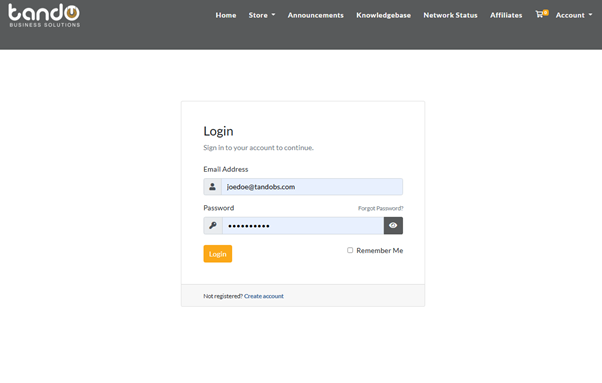
- Login to your tandohost.co.za account Login - TandoHost
2. Go to the View Details
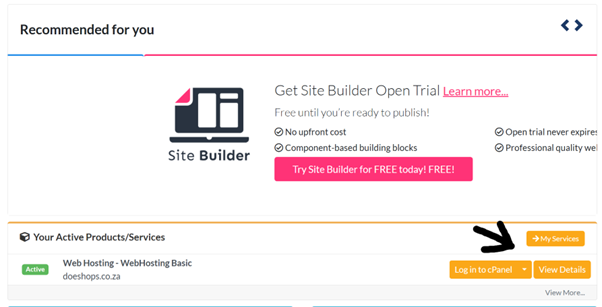
3. Select your Billing Overview. This will help you view any outstanding invoices or payments

4. Pay via one of our secure online payment gateways
Why does my invoice have Nedbank details, but we paid via FNB?
tandohost.co.za has moved from FNB to Nedbank for faster payment allocation.
Nedbank’s API allows for automatic payment matching, ensuring quicker reconnections.
Please use the Nedbank account details listed on your invoice.
Login to Your tandohost.co.za Account Login - TandoHost
- Visit the ttandohost.co.za Login Page.
- Enter your Email Address and Password.
- Click “Sign In” to access your dashboard.
From your Dashboard, you can manage invoices, payments, and hosting services.

