
Why Your Domain Name Matters
Your domain name is a critical part of your online presence. If it expires, your website will go offline, email services will stop, and any connected tools will no longer work. Knowing what happens when a domain expires—and how to restore it—is key to keeping your site active and accessible.
Does Expiry Mean Immediate Deletion?
No. When a domain expires, it isn’t deleted right away. It goes through several stages before becoming available for someone else to register.
What Does Domain Expiry Mean?
When a domain passes its expiration date without renewal, it becomes inactive. This triggers the following:
- Your website becomes inaccessible.
- Emails linked to the domain stop working.
- DNS services are interrupted.
- The domain enters a timeline that includes grace and redemption periods.
What Happens When a Domain Expires?
Here’s the typical process:
- Expiry Day (Day 0)
- The domain expires and becomes inactive.
- Website and email services stop functioning.
- Grace Period (Days 1–30)
- Most registrars allow a grace period where you can renew at the normal rate.
- The domain is under your ownership but remains inactive.
- Some registrars may display ads or a landing page instead of your site.
- Redemption Period (Days 31–60)
- If you miss the grace period, the domain enters redemption.
- You can still recover it, but an extra redemption fee applies.
- The domain is removed from active internet records.
- Pending Delete (Days 61–75)
- After redemption, the domain moves to Pending Delete.
- At this point, recovery is impossible.
- After about 5–7 days, the domain is released to the public for registration.
How to Recover an Expired Domain
If your domain is still in the grace or redemption phase:
- Log in to your client portal (e.g., tandohost.co.za).
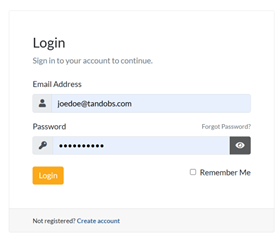
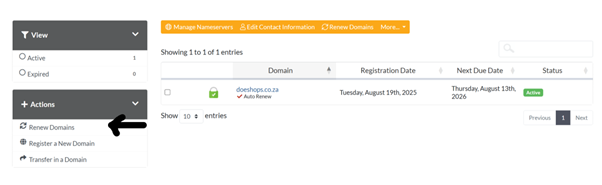
2. Navigate to Domains on the top menu.
3. Click Renew Now next to the expired domain.
Important:
If your domain is in redemption, additional fees apply. Once it hits Pending Delete, you cannot recover it. Act quickly.
Additional Information
Letting a domain expire can cause downtime, loss of traffic, and even permanent loss of your domain. Here are key points:
Preventing Domain Expiry
- Enable auto-renewal.
- Keep payment details up to date.
The Cost of Expired Domains
- Lost SEO rankings.
- Broken email continuity.
- Higher recovery costs.
General Tips
- Update Contact Details: Ensure your registrar has your current email for renewal reminders.
- Watch Out for Backorders: Popular domains are often targeted by resellers when they expire.
- Linked Services Fail: Email, SSL, apps, and subdomains all stop working when the domain expires.
- TLD Rules Differ: Country-specific domains (like .co.za) have different policies than .com or .net.
- Registrar Policies Vary: Always confirm your registrar’s specific grace and redemption timelines.

