
When a website becomes overloaded, it can result in sluggish page speeds, broken functionality, downtime, and unhappy visitors. Beyond the user experience, frequent overloads can even hurt your search engine rankings. If your site starts lagging, producing errors, or going offline during high-traffic periods, it’s crucial to pinpoint what’s straining your resources.
With tandohost.co.za Web Hosting and cPanel’s built-in tools, you can easily track performance, uncover problem areas, and take steps to stabilise your website.
How to Identify Website Overload in cPanel
Follow these steps to investigate the root causes of performance issues using cPanel:
- Log into your tandohost.co.za account. Login - TandoHost
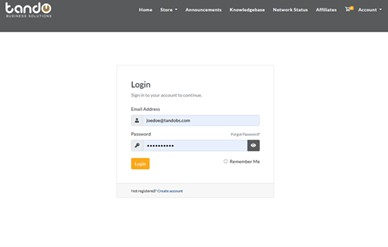
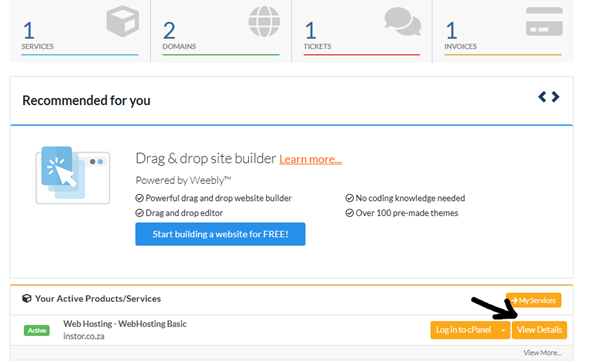
2. Next to your chosen domain, click View details.
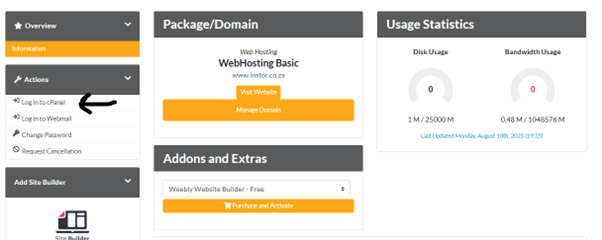
3. Scroll down to the Metrics section in your cPanel dashboard.
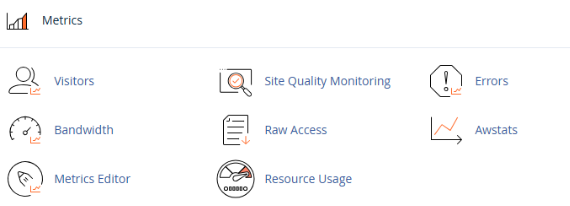
4. Open Resource Usage or CPU and Concurrent Connection Usage.
5. Review the summary for red flags such as CPU overages, memory-limit errors, or process restrictions.
6. Click Details to view usage over time and note spikes that match traffic surges or activity logs.
7. Explore additional metric tools for deeper insights:
- Errors: Look for overload-related issues such as 500 errors.
- Awstats/Webalizer: Monitor visitor behaviour and traffic sources.
- Raw Access Logs: Track direct IPs and activity patterns.
- Bandwidth: Identify large downloads or traffic bursts.
By cross-referencing these reports, you can determine whether the overload is caused by bots, plugins, sudden traffic, or heavy file requests.
Common Triggers of Website Overload
- Traffic Spikes: Sudden surges (especially on shared hosting) can quickly drain limited resources.
- Plugins or Themes: Inefficient or poorly coded add-ons (common on CMS platforms like WordPress) often overuse server power.
- Background Processes: Over-frequent cron jobs or scheduled tasks can tie up server capacity.
- Search Engine Crawlers: Excessive crawling, especially by non-essential bots, can overwhelm your server.
- Unoptimised Media/Code: Large, uncompressed images or poorly written JavaScript and CSS significantly slow page load times.
How to Prevent Website Overload
Here are proactive measures to keep your site running smoothly:
- Optimise Databases: Use phpMyAdmin to tidy up large or sluggish tables and remove duplicate or unnecessary data.
- Control Bots: Adjust your robots.txt to block resource-heavy bots or restrict crawling in certain sections.
- Enable Caching: Implement a caching solution (e.g., LiteSpeed Cache for WordPress) to serve static page versions instead of regenerating them for each visitor.
- Use a CDN: A Content Delivery Network distributes static files (CSS, JS, images) across global servers, improving load speeds and reducing strain on your hosting server.
- Upgrade Hosting: If optimizations aren’t enough, upgrading your hosting plan is often the most effective long-term solution.
By diagnosing the exact cause of overload and applying preventative measures, you can ensure your website stays fast, reliable, and ready to handle growing traffic.

