
Your cPanel Username and Why It Matters
Your cPanel username is a key part of your web hosting account. It allows you to log in to your cPanel dashboard, where you can manage your website’s files, databases, emails, security features, and more. Whether you’re signing in directly to cPanel or connecting via FTP, knowing your username is crucial.
If you’ve misplaced it or just want to confirm what it is, tandohost.co.za makes it quick and simple to retrieve your login details directly through your hosting account control panel.
How to Locate Your cPanel Username
To find your cPanel username in your tandohost.co.za account, follow these steps:
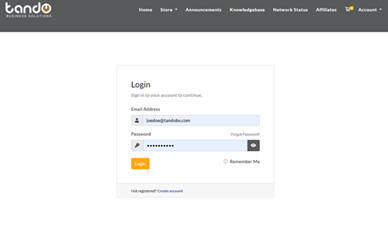
- Log in to your tandohost.co.za account. Login - TandoHost
2. Go to your web hosting plan.
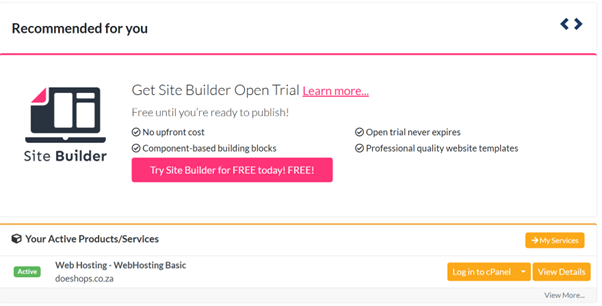
3. Select View details next to the hosting plan linked to your domain.
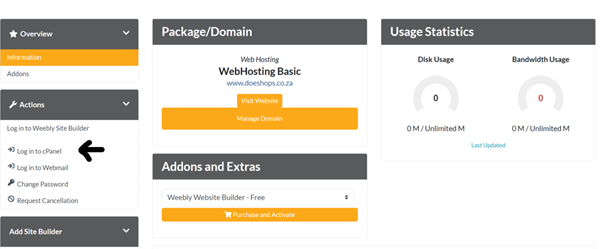
4. Click Login next to the Control Panel option to open cPanel.
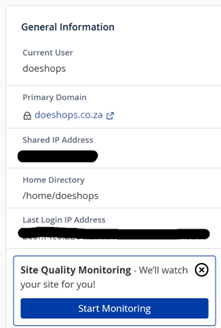
5. Inside cPanel, check the General Information section on the right-hand side. Your username will appear under Current User.
Extra Tips and Information
If You Can’t Find Your cPanel Username
Here are some options to try if you’re struggling to locate it:
- Search Your Welcome Email
Look for your initial hosting setup email (often titled “New Hosting Account Information”). This usually includes your cPanel username. - Use Auto-Login
From your Domains.co.za account dashboard, you can log directly into cPanel without entering a username or password. Just click the Login button. - Check Related Logins
Your cPanel username is often the same as your FTP or database login, unless you’ve set up separate details. - Review Multiple Hosting Accounts
If you have more than one hosting plan, each may have a unique username. Check the Manage/Services section for each. - Default Usernames
Hosting providers usually assign system-generated usernames (e.g., userna5). These generally cannot be changed, though you can reset the password. - Don’t Mix It Up
Remember: your cPanel login is different from your email or Webmail login credentials. - Check Account Status
If login fails, make sure your hosting plan is active and not suspended due to overdue payments or resource limits. - Reseller Hosting Users
Each client under your reseller plan will have their own individual cPanel username.
Security Reminder: Always keep your cPanel username private to safeguard your website.
What is cPanel?
cPanel is a Linux-based control panel that makes it easier to manage your hosting and website. It offers a user-friendly interface and automation tools so you can handle technical tasks without needing advanced coding skills.
Key features include:
- File Manager: Upload, edit, and organize files just like on your computer.
- Backups: Create full or partial backups of your site, databases, and email accounts.
- Email Accounts: Set up professional domain-based emails (e.g., info@yourdomain.co.za) with forwarding and auto-responders.
- Security Tools: Manage SSL certificates and enable HTTPS for safe, encrypted browsing.
- Database Management: Create and control MySQL databases for your website.
- One-Click Installers: Quickly install apps like WordPress, Joomla, or Drupal without manual setup.

