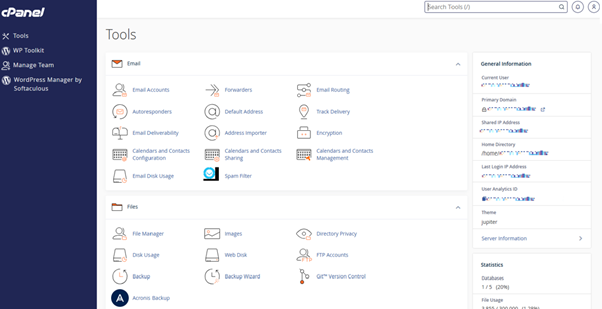
An A (Address) record is a type of DNS record that links your domain name to your website’s hosting server by directing it to the server’s IP address. If you need to update your DNS settings, troubleshoot website issues, or point your domain to a new server, it’s important to know how to locate your domain’s A record in cPanel. With tandohost.co.za web hosting, you can easily access and manage A records, along with other DNS records, directly through the cPanel interface.
How to Locate Your A Record in cPanel
Before following these steps, ensure you are logged into cPanel via your tandohost.co.za account.
- From the cPanel Dashboard, scroll down to the Domains section and click Zone Editor.
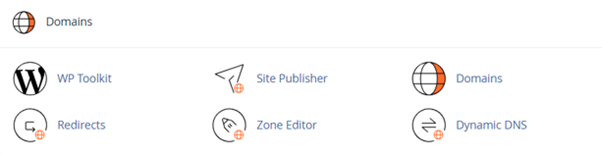
2. In the Zone Editor, find the domain for which you want to view the A record.
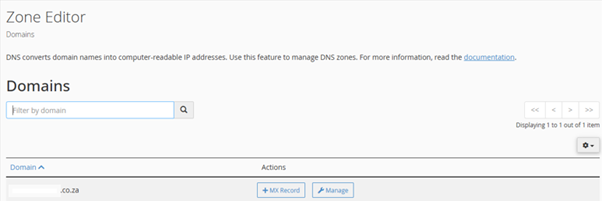
3. Click Manage next to the relevant domain.
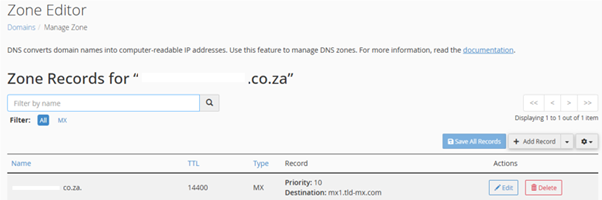
- Use the filter bar to type A, which will display only A records. Locate the record that points to your server’s IP address.
- The Name field usually shows your domain or subdomain, while the Record field displays the IPv4 address the domain currently points to.
Additional Information
What Are A Records?
A records (Address records) are DNS records that map a domain or subdomain to a specific IP address. They allow web browsers to translate human-readable domain names, such as example.co.za, into numerical IP addresses like 198.0.2.1, ensuring visitors reach your website.
A records are used for several purposes:
- Connecting Subdomains: Point subdomains (e.g., blog.yourdomain.co.za or shop.yourdomain.co.za) to different servers than your main domain, such as hosting a blog on a separate platform.
- Updating DNS Settings: If you move your website to a new server or experience issues, adjusting the A record to the correct IP address can restore functionality.
- Pointing to a New Host: When switching web hosting providers, updating your A records to the new server’s IP address is a crucial step.
After Editing DNS Records
Once you’ve modified your domain’s A records, keep these points in mind:
- Changes to A records can take minutes to several hours to propagate across the internet.
- TTL (Time to Live) controls how long DNS servers cache an A record before checking for updates; lower TTL values speed up propagation.
- Use tools like DNS Checker or MXToolbox to confirm your A record is active globally.
- Consider setting up a wildcard (*) A record to direct all undefined subdomains to your server.
- Protect your server IPs and consider using a CDN (Content Delivery Network) like Cloudflare for added security.
- Some third-party platforms may require your A record for domain verification or integration.
Access Your tandohost.co.za Account
1. Open the tandohost.co.za login page in your web browser. Login - TandoHost
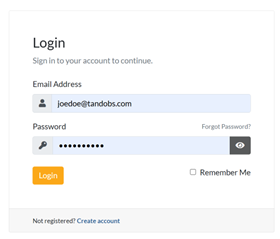
2. Enter your registered email address and password, then click Sign In.
3. Once logged in, you’ll see the tandohost.co.za dashboard. Navigate to Active products/services and log in to cPanel

4. You will now be taken to the cPanel Dashboard, where you can manage all aspects of your website.