
Why Use Addon Domains?
Addon domains allow you to host and manage multiple websites under a single hosting account, making your workflow more flexible, efficient, and cost-effective. This feature is ideal for individuals, businesses, and web professionals looking to simplify their web management.
What You’ll Learn
In this guide, we’ll show you how to create an Addon Domain in cPanel. This tutorial applies to users with tandohost.co.za cPanel Hosting plans and assumes you already have access to cPanel and are logged in.
How to Create an Addon Domain in cPanel
Step 1: Access cPanel
1. Log in to your tandohost.co.za account. Login - TandoHost
2. From the dashboard. Click View details next to your domain.

3. Or Login to cPanel.
Step 2: Create the Addon Domain
5. In cPanel, go to Domains under the Domains section.
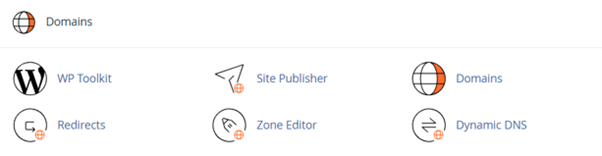
6. Click Create a New Domain.
7. Enter the new domain name in the provided field.
8. Uncheck the option “Share document root (/home/username/public_html) with domain.tld”.
9. Specify the directory where you want the new domain’s files to be stored.
10. Click Submit.
Your new addon domain is now set up! From here, you can manage or delete addon domains from the same interface.
Additional Information
- Each addon domain is stored in its own directory within cPanel.
- You can create and manage addon domains from the Domains section in cPanel.
- The domain must be registered with a hosting provider like tandohost.co.za before adding it to cPanel.
Benefits of Addon Domains
- Manage Multiple Sites: Host several websites under one account, avoiding multiple hosting plans.
- Save Costs: No need to purchase separate hosting packages for each site.
- Optimise Resources: Make full use of your allocated hosting resources.
- Centralised Control: Handle all websites, emails, and databases from a single cPanel.
- Scalability: Add more domains easily without extra accounts.
- SEO Advantages: Leverage combined link equity and boost overall search visibility.
- Ideal for Developers: Host client sites on your account for easier development and maintenance.

