Simplify Bulk Deletion of Posts in WordPress
Managing your website becomes easier when you can bulk delete posts in WordPress. Instead of removing outdated or unnecessary content one by one, you can save time by deleting multiple posts at once. This guide will walk you through the process step-by-step.
This tutorial assumes that you’re already logged into your WordPress Dashboard. It also complements our YouTube video: “Declutter Your WordPress Site: How to Bulk Delete Posts.”
How to Bulk Delete Posts in WordPress
- From the left-hand menu, click “Posts.” You’ll be taken to a list of all your posts.
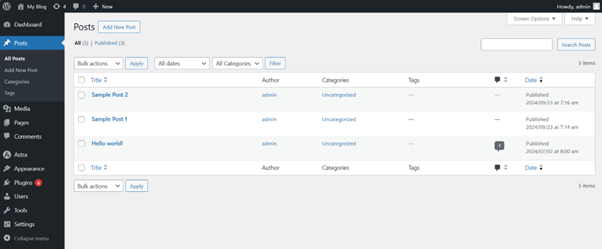
Navigate to Posts Section – Bulk Delete
2. Select multiple posts by ticking the boxes next to their titles. To select all posts on the current page, click the checkbox at the top of the list.
- At the top of the page, open the “Bulk Actions” dropdown menu and choose “Move to Trash.”
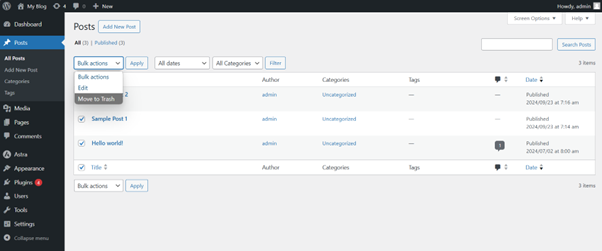
Move Posts to Trash – Bulk Delete
4. Click “Apply” next to the dropdown menu. All selected posts will now be moved to the Trash.
Empty the Trash (Optional)
To permanently delete the posts:
- Go to the “Trash” section under the Posts menu.
- Click “Empty Trash” to permanently remove all deleted posts.
Additional Tips Before Deleting Posts
Filter Posts First:
Use filters (by category, date, tags, etc.) to display only the posts you want to remove.
Quick Edit:
Make last-minute adjustments without opening the full editor.
Check Scheduled Posts:
Ensure you don’t accidentally delete future-scheduled posts.
Review Revisions:
Before deleting, check if older revisions hold important content you may want to keep.
Optimize Your Database:
After bulk deletion, use plugins like WP-Optimize to clean and speed up your site.
Use Trash Wisely:
Posts remain in the Trash for 30 days before permanent deletion.
Consider SEO Impact:
Deleting indexed posts can affect your SEO. Use redirects for URLs that have backlinks. Plugins like Redirection can help.
Access via cPanel from tandohost.co.za
- Log in to your tandohost.co.za account
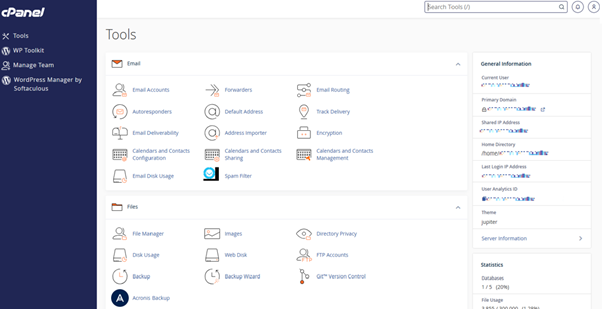
- Click Product/services.
- Click Login to Control Panel.